OSHA 300 — Review and Export the Annual Injury and Illness Log
Review the annual OSHA 300 log in EHSMNA, filter establishment and year, inspect classifications and days, navigate to OSHA 301, and export the official-format PDF.
On this page
Application: OSHA 300
Applies to: EHSMNA — North American EHS localization by Grupo Intelsis, version 0.7.0
Audience: EHS coordinators, recordkeeping specialists, and site managers
Purpose
Use OSHA 300 to review the annual list of recordable cases, compare their classifications and work-impact days, open the corresponding OSHA 301 incident report, and download one establishment's complete annual log as a PDF using the bundled official English form background.
The screen is a read-only view of case data. A separate Create incident app captures new incidents. The OSHA 300A app summarizes the annual log, and Compliance Center manages deadline controls and ITA preparation.
OSHA describes Form 300 as the log of work-related injuries and illnesses. Form 301 provides the individual incident report for a recordable log entry. See 29 CFR 1904.29 — Forms for the regulatory requirements and privacy provisions.
Before you begin
Open EHSMNA in a browser with JavaScript, cookies, and local storage available.
Identify the correct incident Year and Establishment.
For the standard walkthrough, use 2026, Dayton · Plant 01 (US01), and case 2026-015.
The worked example in this guide uses fictional employee and incident information. Sample cases are fictional, while selected NPPES provider records can be real public reference data.
Know whether you are viewing the original samples or a browser that already contains locally created incidents. Local additions change the totals.
The SAP-hosted application requires access to its SAP environment. Browser-local records are specific to the site origin and browser profile; records created on a local/BAS address do not automatically appear on the SAP address.
Open the application
Open the EHSMNA launchpad.
Select the OSHA 300 tile.
Select Year and Establishment as needed.
Open the application through the EHSMNA launchpad in your authorized SAP environment. Use the year and establishment selectors to choose the required records.
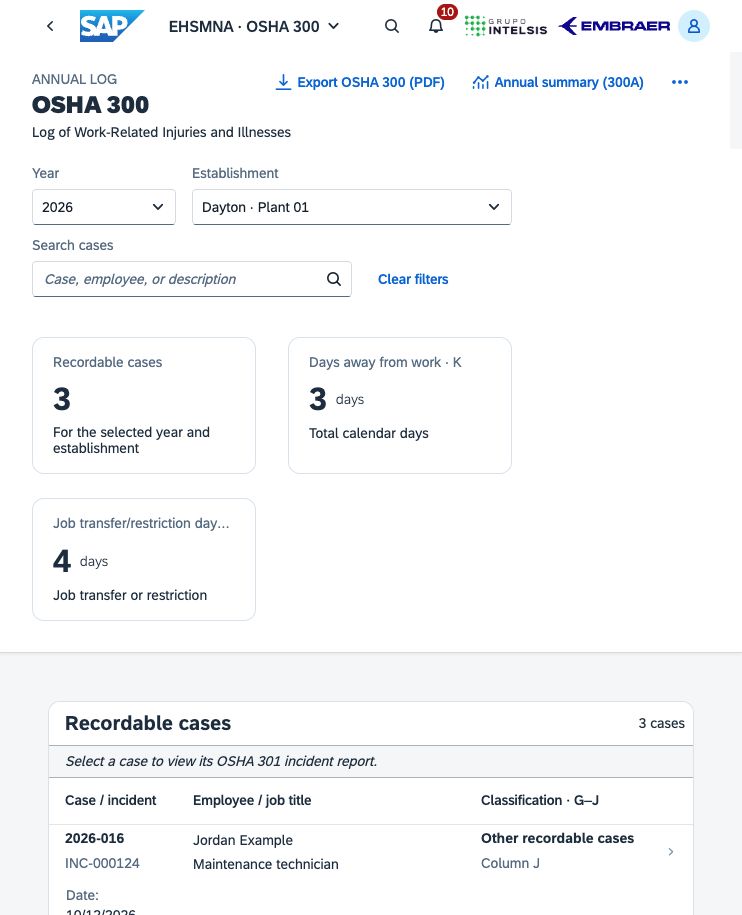
Figure 1. OSHA 300 annual log, including year/establishment filters, totals, and recordable case rows.
Understand the screen
Filters
Control | How to use it |
|---|---|
Year | Select the incident year. The available years include sample and saved case years. Changing the year reloads the list. |
Establishment | Select one location or All establishments for a consolidated view. Changing the selection reloads the list. |
Search cases | Enter a case number, incident reference, employee name, description, or location, then submit the search. The placeholder is Case, employee, or description. |
Clear filters | Clear establishment and search filters. The selected year remains unchanged. |
Refresh | Reload the list from the configured case repository. SAP Incident Management synchronization is not available in the current configuration. |
The three summary cards show Recordable cases, Days away from work · K, and Job transfer/restriction days · L. These values are calculated from the cases currently returned by the screen filters, including a submitted search. The annual PDF intentionally uses a different scope: all recordable cases for one establishment and year.
Case table
Column | Meaning |
|---|---|
Case / incident | The OSHA case number and source incident reference. |
Employee / job title | The employee name and job title recorded in the case. |
Date | The incident date, displayed as MM/DD/YYYY. |
Description / location | The case title and event location. |
Classification · G–J | The single most serious outcome selected for the case. |
Days · K | The calculated calendar days away from work. |
Days · L | The calculated calendar days of job transfer or restriction. |
Type · M | The injury or illness category. |
Form 300 | The source case's log-inclusion status, such as Included. |
The screen uses one outcome per case: G — Death, H — Days away from work, I — Job transfer or restriction, or J — Other recordable cases. The application calculates this outcome from the recorded death date and work-impact periods after considering the case's recordable decision. It does not independently make a complete regulatory recordability assessment.
The six M categories are M1 · Injury, M2 · Skin disorders, M3 · Respiratory conditions, M4 · Poisonings, M5 · Hearing loss, and M6 · All other illnesses.
Select any case row to open its OSHA 301 report. Returning from that report preserves the year, establishment, search, and selected-row context. The table loads additional rows as needed; narrower screens move some columns into the row's responsive details.
Walkthrough: review the same accident in Forms 300 and 301
Set Year to 2026.
Set Establishment to Dayton · Plant 01.
Locate 2026-015 / INC-000123, Left hand laceration, for Alex Example, a Sheet metal operator.
Check the incident date: 10/01/2026.
Confirm H — Days away from work, K = 3, L = 2, and M1 · Injury.
Select the row. OSHA 301 opens the detailed report for that same case.
Review the narrative and the periods: 10/02/2026–10/04/2026 away and 10/05/2026–10/06/2026 restricted.
Select Back to OSHA 300 to return to the log.
Suggested explanation: “This row represents one recordable case. Days away determine the most serious outcome, so the case appears once in column H. Both kinds of work-impact days remain visible: three days in K and two days in L. Opening the row shows the supporting individual incident report.”
With only the original US01/2026 sample cases and no search, expect 3 recordable cases, 3 days away, and 4 restricted-work days. Locally created cases can increase these values. Across All establishments, an additional US02/2026 sample is also included.
The application counts calendar days after the incident day and rejects overlapping away/restriction periods. OSHA's detailed counting requirements, including estimates and an optional 180-day stopping point, are described in 29 CFR 1904.7. The application preserves recorded counts and does not automatically apply that optional cap.
Export the annual OSHA 300 PDF
Select the required Year on the log screen.
Select Export OSHA 300 (PDF).
In the dialog, choose one Establishment. A consolidated All establishments view cannot be exported as one official log.
Review Establishment name, City, and State. State must use a two-letter code, such as OH.
Select Download PDF.
If a designated privacy case requires review, complete that review and select Download PDF again.
Open and inspect the downloaded file before using or distributing it.
The export retrieves all recordable cases for the selected establishment and incident year, even if the screen search shows only one employee or only the first set of rows. Clearing the search is not necessary for the annual export. The header values reviewed in the dialog apply to the exported file; they do not update establishment master data.
Each official log page holds up to 10 cases and includes calculated page totals and log-page numbering. Multiple log pages are generated when needed. A valid establishment/year with no recordable cases can produce a zero-case page.
The PDF uses the bundled English OSHA form, revision 04/2004, OMB control number 1218-0176, at 14 × 8.5 inches, legal landscape. Generation takes place in the browser without an external PDF-processing service. Print at the original page size or deliberately review the printer's scaling settings.
Privacy-case review
If a source case is designated as private, its exported employee name is replaced with privacy case. The dialog asks the reviewer to complete:
Privacy-safe job title (column C)
Privacy-safe event location (column E)
Privacy-safe injury or illness, body part and harmful object (column F)
Provide a useful description without identifying or intimate details. These review values are used only for this export and do not change the stored incident or its OSHA 301 report. The application checks some obvious identifier reuse, but it does not identify every privacy case or every indirect identifier. The log screen itself is not an anonymized public view.
Validation and output behavior
The exporter blocks mixed establishments or incident years, duplicate case numbers, undecided recordability, and missing core log information. Required establishment fields and privacy-review fields must also be valid.
Supported multiline text that cannot fit legibly is preserved on labeled continuation pages. Other oversized values or characters unsupported by the bundled font produce an error rather than being silently removed. Full Unicode coverage is not included.
The downloaded PDF remains editable. Page totals are calculated at export and marked read-only; editing individual values later in a PDF viewer does not recalculate them. Correct the source data and generate a fresh file when totals change.
Navigate to related work
Annual summary (300A) opens the annual summary using the selected year and establishment. That summary uses the complete annual scope rather than the case search.
Compliance Center opens deadline and compliance controls with the current scope.
Create incident opens local incident capture with the current year/establishment context.
Home returns to the EHSMNA launchpad.
The PDF download does not record a compliance completion, certify the annual summary, report a severe event, or submit data to ITA. Those are separate activities. ITA CSV preparation is available in Compliance Center → ITA preparation.
Troubleshooting
Symptom or message | Action |
|---|---|
No cases match the selected filters. | Confirm year/establishment, clear the search, or use Clear filters. A valid zero-case scope is possible. |
Unable to load cases. Select Refresh to try again. | Select Refresh. If the error continues, check connectivity and the configured repository. |
The PDF contains more cases than the filtered screen | Expected: the PDF is the complete annual establishment log, independent of search and visible rows. |
Export asks for one establishment | Select a single establishment in the export dialog and verify its location fields. |
Export requests privacy-safe descriptions | Complete each designated privacy case's review and select Download PDF again. |
Export reports an inconsistent or incomplete case | Correct the source through the responsible process. This read-only log cannot edit the case. |
New incidents are missing after switching browser or URL | Local records belong to the original browser profile and site origin. Use that origin/profile; the application does not replicate them across devices or SAP/local addresses. |
The download appears clipped when printed | Use legal landscape paper or inspect the printer's scaling option. Review all continuation pages. |
Storage, integration, and operating requirements
SAP hosting supplies the UI runtime. SAP Incident Management integration is planned and is not connected to the case repository in this configuration. New cases and compliance evidence remain browser-local. Enterprise case-number allocation, a centrally controlled record archive, an authenticated approval workflow, and automatic identification of all privacy content are not available in this configuration.
The Included source status means the case belongs in the log. It is not an OSHA acceptance, an ITA receipt, or proof that the employer's process meets every applicable requirement. The organization must establish validated regulatory decisions, access controls, retention, review, integration, and data governance for its operating environment.
Related references
Related application articles: Create incident, OSHA 301, OSHA 300A, and Compliance Center.
Related application guides
Was this article helpful?
Related articles
Compliance Center — Track Deadlines, Severe Events, and ITA Preparation
Use EHSMNA to track OSHA recording deadlines, assess severe events, prepare reporting drafts, and validate ITA CSV files and external submission evidence.
OSHA 300A — Annual Summary, Review, Certification and Posting
Prepare the annual OSHA 300A summary in EHSMNA, reconcile totals, export the official-format PDF, and track review, external executive certification and posting.
OSHA 301 — Review and Export an Individual Incident Report
Review an individual OSHA 301 report in EHSMNA, including employee and health-care information, incident narratives, OSHA 300 classification, and PDF export.
Create Incident — Capture a Case for OSHA 300 and 301
Capture workplace incident facts, employee and health-care details, recordability, and work-impact dates in EHSMNA, then review the linked OSHA 301 report.