OSHA 301 — Review and Export an Individual Incident Report
Review an individual OSHA 301 report in EHSMNA, including employee and health-care information, incident narratives, OSHA 300 classification, and PDF export.
On this page
Application: OSHA 301
Applies to: EHSMNA — North American EHS localization by Grupo Intelsis, version 0.7.0
Audience: EHS coordinators, incident reviewers, and occupational-health recordkeeping teams
Purpose
Use OSHA 301 to inspect the individual Injury and Illness Incident Report, understand its relationship to the OSHA 300 log, review employee/health-care details and the four incident narratives, and download a PDF using the bundled official English form background.
This application is read-only. It shows information provided by the case repository; it does not edit an existing incident or diagnose an injury. Use Create incident to capture a new case. Make corrections through the responsible source process; this application does not provide an incident editor. SAP Incident Management integration is planned and is not active in this configuration.
For recordable cases entered in the OSHA 300 log, OSHA requires a Form 301 incident report or an equivalent form containing the same information. See 29 CFR 1904.29.
Before you begin
Identify the incident year and case to review.
For the standard walkthrough, use 2026-015 / INC-000123, Left hand laceration, at US01.
Use the same browser profile and site origin where a locally created case was saved.
Treat employee, address, medical, and provider details as confidential. Downloaded reports must follow the organization's authorized handling process.
The worked example in this guide uses fictional employee and incident data. NPPES provider selections are public reference records and can contain real professional/organization details.
Open a report
From the annual log
Open OSHA 300.
Select the appropriate Year and Establishment.
Select a case row.
OSHA 301 opens that case and preserves the return context.
From the launchpad
Select the OSHA 301 tile.
On Select a case, select Incident year.
Select an Incident in the chooser.
Select Open case.
The chooser includes both recordable cases and incidents retained as not recordable. A non-recordable option is labeled Not included in OSHA 300. The available case list is limited to its selected year and any establishment context passed to the app.
Open the application through the EHSMNA launchpad in your authorized SAP environment. Select the required case from the chooser or open it from the OSHA 300 log.
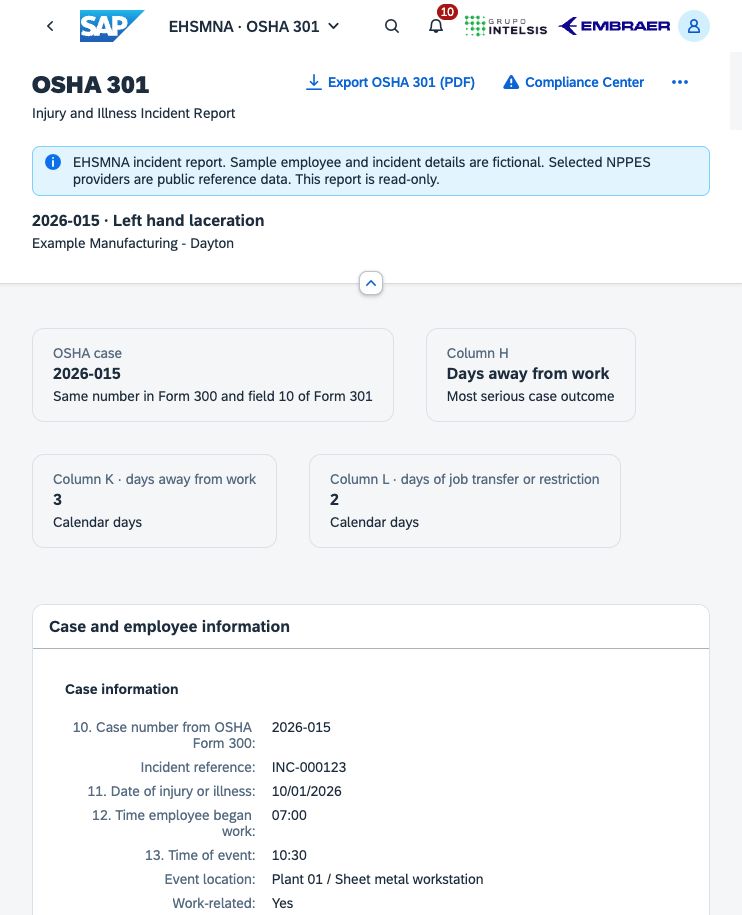
Figure 1. OSHA 301 individual incident report, with linked case number, outcome, days, and employee details.
Understand the report header
The supplied sample report contains fictional employee and incident details. Selected NPPES providers are public reference data. The report is read-only.
For an open case, the header shows its case number, title, and establishment name. Four cards summarize:
OSHA case — the shared log/report case identifier.
Column G/H/I/J, as applicable — the most serious case outcome. A non-recordable incident instead shows Not recordable and Excluded from the OSHA 300 log.
Column K · days away from work — the calculated calendar-day count.
Column L · days of job transfer or restriction — the calculated calendar-day count.
The same record supplies both the OSHA 300 row and OSHA 301 details. A case can have both K and L days while appearing in only one most-serious-outcome column.
Review every report section
Case and employee information
The Case information group shows:
Displayed field | What to review |
|---|---|
10. Case number from OSHA Form 300 | The case identifier linking the individual report to the annual log. For non-recordable incidents, the on-screen incident identifier is retained, but PDF field 10 is blank. |
Incident reference | The source incident reference, such as INC-000123. This is distinct from the OSHA case number. |
11. Date of injury or illness | The incident date. Dates are displayed as MM/DD/YYYY. |
12. Time employee began work | The employee's shift-start time. |
13. Time of event | The recorded event time. |
Event location | The work area in which the event occurred. |
Work-related | The source work-relationship decision: Yes, No, or Not provided. |
Recordable case | The source recordability decision. |
Injury or illness classification | The selected injury/illness category. |
The Employee information group shows 1. Full name, Job title, 2. Street address (combined street/city/state/ZIP), 3. Date of birth, 4. Date hired, and 5. Sex.
These values are confidential source data. Privacy-case masking in a Form 300 export does not anonymize this individual report.
Health care information
The Health care received group contains 6. Physician or other health care professional, 7. Treatment facility, Facility address, 8. Treated in an emergency room, and 9. Hospitalized overnight as an in-patient.
When provider-directory information is present, the application additionally displays Professional NPI, Provider taxonomy code, NPPES practice location, Professional directory snapshot, Facility NPI, and Facility directory snapshot. These labels are visible only when their corresponding source metadata is available.
The Treatment and outcome group shows Treatment, Medical treatment beyond first aid, and 18. Date of death, if applicable. When no fatality applies, the death field shows Not applicable; no fatality; a death outcome with a missing date shows Date not provided.
Review the actual treatment facility address separately from the professional's directory practice address. The Form 301 PDF uses the recorded treatment facility/address for field 7. An NPI is a directory identifier, not proof that a professional treated this incident or that the listed practice is the actual treatment location.
Important distinction: the displayed Form 301 question asks about overnight hospitalization. Compliance Center's severe-event assessment and ITA's reviewed inpatient answer ask about formal inpatient admission for care/treatment. An overnight No does not establish that there was no same-day formal admission. Review the actual facts in the respective workflow.
Incident description · fields 14–17
Read the four narratives together:
14. What was the employee doing just before the incident occurred? — the activity immediately before the event.
15. What happened? — the event sequence.
16. What was the injury or illness, and what part of the body was affected? — the resulting condition and affected body part.
17. What object or substance directly harmed the employee? — the direct harmful object/substance.
The banner says Keep personal identifiers out of incident descriptions. Use factual descriptions of work, event, condition, and object. This read-only screen does not remove identifiers automatically.
Days away from work and work restrictions
The period table displays Type, Start, End, Days, and Description. Period types appear as Days away or Restricted work. An empty table displays No days away or work restrictions have been recorded.
The application calculates calendar days, excludes the incident day, and rejects overlapping away/restriction periods. The most serious recorded outcome determines one G–J classification. For a non-recordable incident, periods describe work impact but do not contribute to the OSHA 300 log.
These periods support the case review; they are not additional fields on the official Form 301 PDF. For regulatory counting requirements, refer to 29 CFR 1904.7. The application does not automatically impose the optional 180-day stopping point.
Report preparation
The Prepared by group contains Completed by, Title, and Phone. The Report status group contains Date completed, OSHA 301, and OSHA 300.
The Complete / Draft values are source completeness indicators. For locally created cases, the application checks whether additional employee, time, provider/facility, preparation, and Yes/No medical fields have been supplied. This is a limited data check; Complete is not legal approval, a digital signature, an OSHA receipt, or proof that the medical facts were verified.
Walkthrough: case 2026-015
Open case 2026-015 / INC-000123, Left hand laceration.
Confirm Alex Example, Sheet metal operator, 10/01/2026, shift 07:00, and event 10:30.
Review the health-care section: Dr. Taylor Example, Example Occupational Clinic, treatment Sutures at an outpatient clinic. The sample has emergency-room and overnight-hospitalization answers No.
Read fields 14–17. The employee was positioning a steel sheet; the left hand slid across a sharp edge, causing a laceration to the palm treated with sutures.
Review 10/02/2026–10/04/2026, 3 days away, and 10/05/2026–10/06/2026, 2 restricted-work days.
Confirm H — Days away from work, K = 3, and L = 2.
Check Morgan Example, EHS Coordinator, as the sample preparer, with preparation date 10/07/2026.
Select Back to OSHA 300 and compare the corresponding row.
Suggested explanation: “Form 301 explains the individual event behind the annual log entry. The case number connects the forms. We can trace the case from employee and treatment information to the four narratives and work-impact periods, then return to the same annual log context.”
All people and incident details in this walkthrough are fictional. Provider records selected separately from NPPES can be real public data.
Export the official-format OSHA 301 PDF
Open the exact case to export.
Select Export OSHA 301 (PDF).
Read the confidentiality notice. If the source status is Draft, the dialog reminds you to review missing information before using the report as a completed record.
Select Download PDF.
Inspect the complete file, including any continuation pages, before use or distribution.
The export includes official fields 1–18 plus the report-completion section: employee details, treating professional, actual treatment facility/address, emergency-room and overnight-hospitalization answers, linked log number, dates/times, four narratives, date of death when applicable, and preparer name/title/phone/date.
NPI, provider taxonomy, NPPES provenance, source incident reference, extra treatment text, and work-impact period tables are application review information; they are not separate fields on the official Form 301.
The PDF uses the bundled English form, revision 04/2004, OMB control number 1218-0176, at 14 × 8.5 inches, legal landscape. Generation and download take place in the browser; employee/medical values are not sent to an external PDF service.
Missing values and non-recordable incidents
The exporter can create a PDF for an incomplete case; missing optional report data remains blank. A successful download does not make a Draft report complete.
Unanswered emergency-room and overnight-hospitalization questions leave both Yes/No options unselected. An unknown answer is not changed to No.
A missing event time stays blank. The official indeterminable-time option is selected only when the source explicitly contains the unknown-time indicator. The current incident-creation form requires an event time.
A non-recordable incident can be retained and exported, but it is excluded from OSHA 300. PDF field 10 remains blank because it has no corresponding log entry.
Supported multiline text that cannot fit legibly is retained on labeled continuation pages. Unsupported font characters and other fields that exceed their supported size trigger a clear error. The exporter does not silently discard text. Review printer scaling and continuation references.
The downloaded PDF remains editable and contains confidential information. Changes made in a PDF viewer do not update the source record in EHSMNA, annual totals, certification snapshot, or compliance evidence. Correct the source through the responsible process and export again when necessary.
Navigation and related activities
Back to OSHA 300 returns to the log with its previous year/establishment/search context and selected case.
Select another case opens the chooser for the case year, retaining applicable establishment context.
Compliance Center opens controls using the selected case's year, establishment, and case identifier. Use it for recording deadlines, severe-event assessment, and ITA preparation.
Home returns to the EHSMNA launchpad.
The OSHA 301 PDF is a recordkeeping output. It does not notify OSHA of a severe event and is not an ITA upload file. ITA uses a separately reviewed case-data CSV prepared through Compliance Center → ITA preparation. That workflow omits designated identifying fields and requires free-text privacy review; it does not upload the file automatically.
Troubleshooting
Symptom or message | Action |
|---|---|
No cases were found for this year and establishment. | Confirm Incident year and the establishment context. Check whether the incident has been registered, or return to OSHA 300 to choose another scope. |
Open case is disabled | Select an existing entry from the Incident chooser. Typing unrecognized text does not select a valid case. |
The requested case was not found. | Check the link or use Select another case / Back to OSHA 300. A locally created case may belong to another browser/site origin. |
The case could not be loaded. Try again or return to OSHA 300. | Select Try again. If it persists, check connectivity and repository availability. |
A date or decision shows Not provided | The source lacks a value. Do not interpret an absent decision as No. This screen cannot correct it. |
NPI or directory fields are absent | Those fields appear only when source metadata is present; manual provider entries may have none. |
Source status remains Draft | Review employee, time, health-care, preparation, and medical-answer completeness in the source process. Downloading does not update the status. |
The PDF omits NPI or the work-impact table | Expected: those are not separate fields on the official form. |
The PDF has extra pages | Read the labeled continuations; long supported narratives are preserved there. |
The PDF reports an unsupported character or oversized field | Review the indicated source value. Full Unicode coverage is not included in the bundled PDF font. |
Storage, integration, and operating requirements
The SAP-hosted application does not read or update live SAP Incident Management records in the current configuration. Locally created cases stay in browser storage. Automatic cross-device synchronization, a centrally managed archive, authenticated case approval, and a medical-data authorization model are not available in this configuration.
NPPES lookup is provided by the local/BAS service when available. The large NPPES database is not hosted inside the SAP BSP; manual provider entry remains available in incident creation until a suitable backend is hosted. A directory selection does not validate the treatment history.
The organization must establish validated integration, permissions for personal and health-care data, recordkeeping decisions, retention, review, and a controlled correction process for its operating environment. Neither Complete nor a PDF download establishes complete regulatory compliance.
Related references
Related application articles: Create incident, OSHA 300, OSHA 300A, and Compliance Center.
Related application guides
Was this article helpful?
Related articles
Compliance Center — Track Deadlines, Severe Events, and ITA Preparation
Use EHSMNA to track OSHA recording deadlines, assess severe events, prepare reporting drafts, and validate ITA CSV files and external submission evidence.
OSHA 300A — Annual Summary, Review, Certification and Posting
Prepare the annual OSHA 300A summary in EHSMNA, reconcile totals, export the official-format PDF, and track review, external executive certification and posting.
OSHA 300 — Review and Export the Annual Injury and Illness Log
Review the annual OSHA 300 log in EHSMNA, filter establishment and year, inspect classifications and days, navigate to OSHA 301, and export the official-format PDF.
Create Incident — Capture a Case for OSHA 300 and 301
Capture workplace incident facts, employee and health-care details, recordability, and work-impact dates in EHSMNA, then review the linked OSHA 301 report.