EHSMNA Overview — North American EHS Localization by Grupo Intelsis
Meet EHSMNA, Grupo Intelsis’s North American localization for SAP EHS. Explore the connected Fiori applications, U.S. OSHA workflows, reporting lifecycle, and integration approach.
On this page
EHSMNA is the North American localization of SAP Environment, Health and Safety (SAP EHS), developed by Grupo Intelsis. It brings regional safety processes into connected SAP Fiori applications, helping teams organize incident information, prepare occupational injury and illness records, and track review and reporting activities.
This article introduces EHSMNA and directs you to the application guides. Version 0.7.0 covers United States Occupational Safety and Health Administration (OSHA) recordkeeping and reporting preparation.
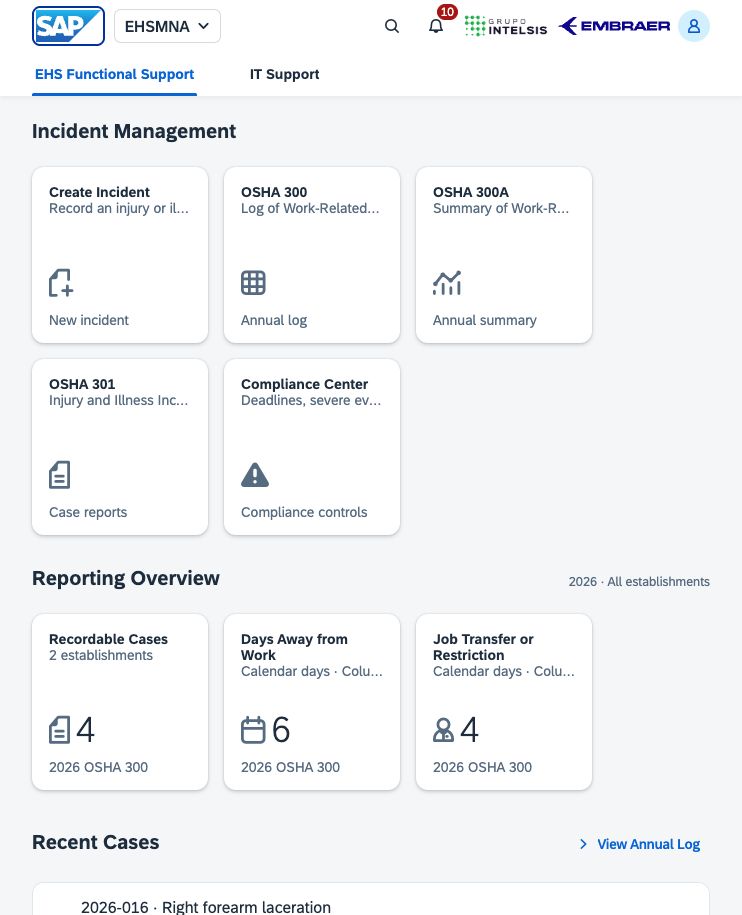
The EHSMNA launchpad provides a single entry point for incident capture, case reports, annual summaries, and compliance controls. The screenshot contains sample data.
What EHSMNA brings to SAP EHS
EHSMNA connects the information used by safety teams across an incident's reporting lifecycle:
Incident capture: establish the case facts, employee details, health-care information, and work impact.
Case reporting: review the individual incident report and its relationship to the annual log.
Annual recordkeeping: organize recordable cases by establishment and calendar year, then reconcile the annual summary.
Review and certification tracking: document review steps, references to external executive certification, and posting evidence.
Compliance preparation: track recording deadlines, assess severe events, and prepare annual electronic-submission files for external processing.
EHSMNA is a North American localization; these guides cover its U.S. OSHA workflow. Confirm each deployment's regulatory coverage, including country, state or provincial requirements, establishment applicability, and additional localization components.
Who uses the solution
EHS coordinators and safety specialists capture and review case information, classifications, and work-impact days. Site managers and annual-reporting reviewers reconcile the log, annual totals, employment figures, and supporting evidence. Eligible company executives review and certify the annual summary through the applicable external process. SAP EHS and integration teams define authoritative data sources, field mappings, access controls, and backend integration for each deployment.
Access to employee and medical information should follow the organization's authorized roles and handling procedures.
Applications at a glance
Application | Purpose | Main output or control |
|---|---|---|
Capture a workplace incident, employee and medical details, recordability, and work-impact periods. | A linked case that opens in OSHA 301. | |
Review one Injury and Illness Incident Report, including the incident narratives and health-care details. | An individual case report and PDF export using the official English form layout. | |
Review the Log of Work-Related Injuries and Illnesses for an establishment and year. | Recordable case entries, outcome classifications, day totals, and annual log PDF. | |
Prepare the Summary of Work-Related Injuries and Illnesses and track annual review, external certification, and posting. | Annual totals, establishment and employment details, summary PDF, and local workflow history. | |
Track recording deadlines, assess severe events, and prepare files for OSHA's Injury Tracking Application (ITA). | Case controls, private reporting drafts, validated ITA CSV preparation, and references to externally completed reporting. |
ITA preparation is part of Compliance Center. It is accessed through the ITA preparation tab alongside Recordkeeping deadlines and Severe events.
How the applications work together
Capture the incident. Select the establishment and enter the incident facts in Create Incident. Review the recordability decision and any days away or restricted-work periods before saving.
Review the individual case. OSHA 301 displays the employee, event, treatment, and narrative information for that case. The case number links the detailed report with the corresponding annual log entry.
Review the annual log. OSHA 300 groups recordable cases by establishment and incident year. Review each outcome classification and the calendar-day totals.
Prepare the annual summary. OSHA 300A aggregates the log and adds establishment, employment, and executive information. After year end, follow the review, external certification, and posting controls.
Maintain compliance controls. Use Compliance Center throughout the case and annual processes. Review recording deadlines and severe-event obligations separately, then prepare ITA files when applicable and supported by the selected reporting year.
The establishment, reporting year, and case number provide the shared context across the applications. A case report, an annual summary, a severe-event report, and an ITA submission are distinct records or activities; each has its own review and completion steps.
Your first walkthrough
Start with the fictional 2026 / US01 / case 2026-015 example:
Open the launchpad and select OSHA 300.
Select 2026 and Dayton · Plant 01. Review the annual totals and open case 2026-015.
In OSHA 301, inspect the incident facts, narratives, health-care details, and the connection to the log. Review the PDF export option.
Open OSHA 300A for the same establishment and year. Compare its totals with the log, then inspect the establishment, employment, and certification-preparation sections.
Open Compliance Center and explore its three tabs. Review any missing assessments and preparation requirements before recording a completion or exporting a file.
Use Create Incident when ready to add another fictional case. Fill sample populates the form for review; Create incident saves the case record.
An open reporting year can be reviewed as a draft. The annual certification workflow requires the year to have ended, and ITA upload-file preparation is restricted to the previous calendar year in the current implementation. The application guides explain the date checks and a closed-year walkthrough.
Data storage and integration
EHSMNA provides an English SAP Fiori interface and can be hosted in SAP S/4HANA or previewed locally through SAP Business Application Studio. New incidents, annual details, compliance controls, and workflow history are stored in the current browser. Records are specific to the site address and browser profile.
SAP Incident Management is the planned source for backend integration. Hosting the application in SAP does not persist its browser-local records as SAP Incident Management business objects. The integration design must define source mappings, persistence, authenticated identities, permissions, document handling, retention, and audit controls.
EHSMNA generates PDFs and prepares reporting information. Executive signing, physical posting, severe-event communication to OSHA, and ITA upload are completed externally. The applications can record references to those external activities. They do not apply an electronic signature or send a government submission. On-screen alerts refresh while the app is open.
The worked examples in these guides use fictional employee and incident information. Consult the five application guides for detailed procedures, validation messages, export behavior, and current implementation boundaries.
Was this article helpful?